How to set up a payment plan
You can set up a payment plan if you want to pay outstanding items in instalments in the Tax Account. To do so, you/your business must meet a number of conditions. For example, your business can only have 1 payment plan at a time, and you can't set up a payment plan if your business has Tax Account debt that has been transferred for collection to the Danish Debt Collection Agency.
In the same way as for interest in the Tax Account in general, interest included in the payment plan is not interest-bearing as from 1 January 2026.
Read more on this page about what you need to check in advance before setting up a payment plan. See also the below video about payment plans.
Before you can set up a payment plan, you must be aware of the following:
- You can set up a payment plan in E-tax for busineses. Make sure to do it no later than 4 p.m. the day before you want the payment to be made.
- You can't enter a payment plan if the total claim is less than DKK 800.
- we recommend that all claims are included when you set up a payment plan.
- If the business has Tax Account claims that are not covered by the payment plan and for which the payment deadline is exceeded, the payment plan will be discontinued.
- Certain types of claims can't be included in a payment plan. This applies to:
- Estimates
- Customs claims
- Land tax and service charge
- Tax on unearned income, royalty tax and dividend tax
- Administrative fines and penalty payments
- The business must have complied with any previous payment plans in the Tax Account within the past month.
- The maximum duration of the payment plan is 1 year.
- The first instalment of a payment plan falls due between 8 and 30 days after you have set up the plan. The first payment date must be on a weekday. You will receive an error message if the first payment date is set as a non-banking day.
If you don't submit a declaration on time, we will make a provisional calculation. We call this an estimate and we make estimates for late declaration of VAT, excise duties, payroll tax, A-tax and labour market contributions.
If you have received an estimate, you have to change our estimate to the correct amount in our online self-service system E-tax for businesses (TastSelv Erhverv) as soon as possible. In fact, the amount that we have estimated can't be included in a payment plan.
If you have not had any revenue in your business, you must submit a so-called zero declaration in which you declare DKK 0.
So, we recommend that you replace the estimate with the correct amount before setting up a payment plan.
Read more about estimates and how to change our estimate to the correct amount.
A business must meet the following conditions to be able to set up a payment plan:
- The business must not have Tax Account debt that has been passed on for collection.
- The business can only have 1 payment plan at a time.
Guide on how to meet the conditions
Below you can find help on how to meet the conditions, so that your business can set up a payment plan.
If the business meets all the conditions, you can proceed to step 2: How to set uo a payment plan.
How to use the guide
Select the situation(s) applicable to your business. You will then receive a description of what applies to the selected situation.
If you don't know whether the business meets the conditions, you can click the question marks next to each line to get a description of how to check this.
When your business meets all the above conditions, you can proceed to step 2: How to set up a payment plan.
What to do:
1. Log on to E-tax for businesss (TastSelv Erhverv)
2. Select Skattekontoen (Tax Account)
3. Select Betalingsordning (Payment plan)
4. Select Opret ny betalingsordning (Set up new payment plan)
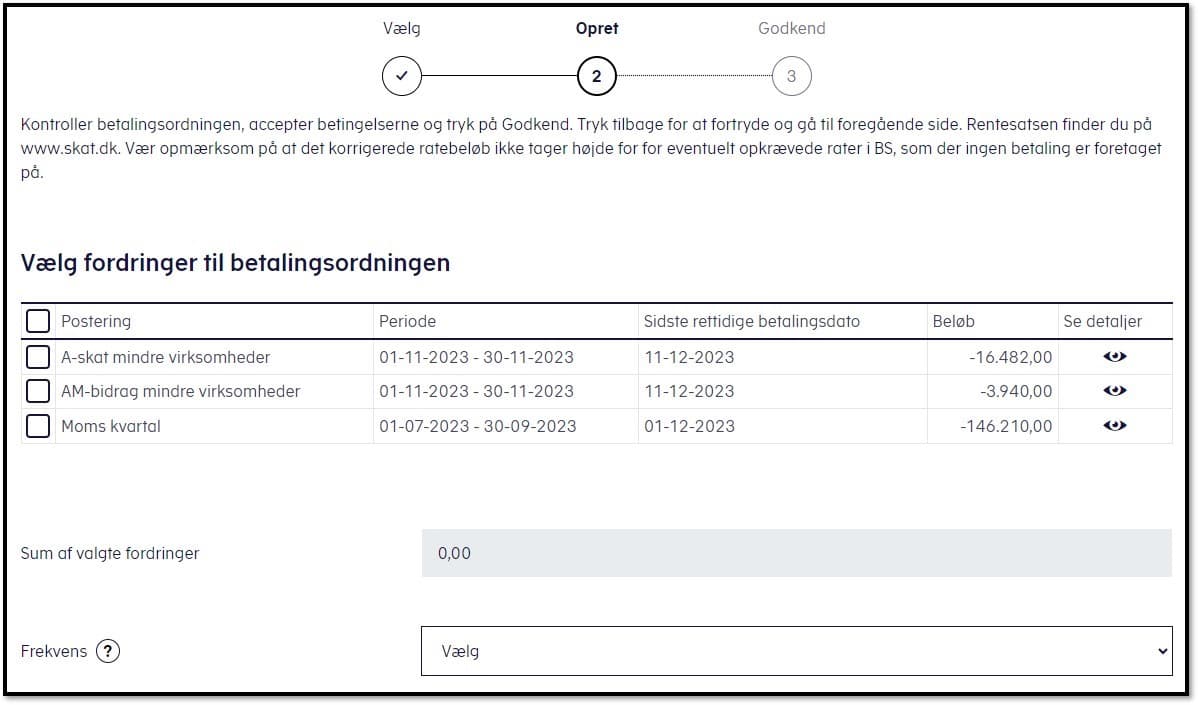
5. Select the claims you want to include in the payment plan. Please note that there are several pages with claims. You can hoose which and how many claims you want to include in the payment plan. Remember that the claims that you don't include in the payment plan must be paid on time. If you don't comply with the business’s payment deadlines, the payment plan will be discontinued, and you will receive a reminder for payment of outstanding debt. Choose how often you want to pay an instalment (monthly or every 2 weeks).
6. Select calculation method (either amount per instalment or number of instalments)
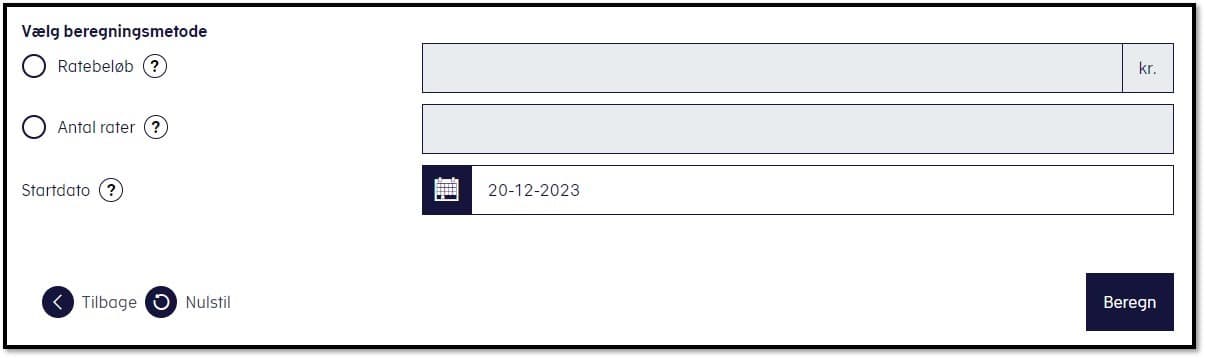
7. Choose the date for your first instalment. This must be between 8 and 30 days from the day you set up the payment plan. The first instalment must not be a non-banking day. If you have chosen monthly payment, the number of instalments can be maximum 12. If you have chosen payment every two weeks, the number of instalments can be maximum 26.
8. Select Beregn (Calculate). If you get an error code saying “162: Not possible to calculate interest”, you change the first payment day to a banking day.
9. Check whether your entries match your wishes. Then accept the terms of the payment plan.
10. Select Godkend (Accept).
Once you have accepted the payment plan, you will get a receipt in your business’s Digital Post.
11. You have now set up the payment plan.
Do you need help to set up a payment plan?
Call us on (+45) 72 22 28 00 if you need help setting up the payment plan. Log on to E-tax for businesses before you call us to get help right away.
You must remember to pay the payment plan instalments on time.
How to pay
You can pay via:
- Online banking
- Visa/Dankort or Dankort
- MobilePay
You can also pay via Betalingsservice (Direct Debit). You can find the registration details in the letter of receipt, “Here is your agreement”, which we sent to your business’s Digital Post when you set up the payment plan.
Read more about payments to the Tax Account.
The payment is not earmarked for the payment plan
Please note that the payment is not earmarked for the payment plan. This means that your payment may be used to cover other items in the Tax Account. So, keep an eye on your Tax Account to ensure that you have enough money in it to cover the instalments as well as any interest and other items.
Remember to declare your business’s obligations (for example VAT or A-tax) on time and remember to pay them. If you don't pay, this may mean that the money you pay into the Tax Account for the payment plan instalments will be used to cover other debt, and as a result the business will no longer comply with the terms of the plan. Read more in the section The oldest debt is paid first.
Special conditions for ‘corona loans’: If you don't submit declarations on time and receive an estimate, this means that the business no longer meets the conditions for the loan, and that we will terminate it. This also means that the payment plan will cease if it includes the loan.
Special conditions for negative declarations: If the business has a receivable amount in connection with a negative declaration, the money will be offset against both items and the existing payment plan.
Estimates
A payment plan will be discontinued as defaulted if all ongoing instalments, claims and interest are not paid on time. This also applies if you receive an estimate due to a late declaration. If you don't submit and pay your new declaration as soon as possible, you risk that the payment plan will be discontinued.
Pay interest
If interest accrues on the Tax Account that is not covered by the payment plan, you must pay this interest to the Tax Account. Otherwise, you risk that we discontinue the payment plan. The interest is not deductible.
If you are submitting a declaration for a period that dates back in time, you should especially be aware that interest will be charged as from the original payment deadline for the period. Therefore, keep an eye on your Tax Account balance in this situation.
The interest is based on a day-to-day interest rate that accrues on the last day of the month. The interest can be seen in the Tax Account at the beginning of the following month.
If the outstanding amount and the accrued interest are not paid immediately, you risk that your payment plan will be discontinued.
The oldest debt is paid first
All the business’s payments and disbursements are included in a total balance. So, you can't earmark a payment for a specific entry – for example to cover the remaining instalments on a payment plan.
When we receive your payment, the money is used to cover entries that are in the account and ready to be paid. This means that your paid amount may first be used to cover other items than the business’s debt.
You can always see in the Tax Account how and when a payment has been used and how an entry has been paid. View the details display that you obtain by clicking the individual payment or entry.
Keep an eye on the business’s Tax Account balance and make sure to pay due amounts on time. You must also pay the amounts not covered by the payment plan on time. This also applies to interest and fees. Otherwise, the payment plan will be discontinued, and we will send you a reminder for payment of the full debt.
If you fail to meet the payment plan deadlines or other payment deadlines, we will discontinue the payment plan and send a reminder for payment of the full debt. You will not be able to create a new payment plan until 30 days after the previous payment plan has been discontinued.
If, in the meantime, the business has had Tax Account debt for collection, you will not be able to enter into a new payment plan until you have paid the Tax Account debt.
Please note that you will not receive a notification from us if we discontinue your business’s payment plan. You can see in your business’s Tax Account under Payment plan whether your business’s payment plan has been discontinued.
Normally, you can pay an amount up to 5 weekdays before the payment deadline.
However, if you have a payment plan in the Tax Account, you can't make payments on your other obligations before the due date.
The reason is that the payment may be offset in the payment plan. Instead, make the payment on the same day on which the obligation falls due.
Please note that if you have a payment plan in your Tax Account and you submit a negative declaration/late declaration (for example VAT, A-tax, etc.) and/or overpaid corporation tax, or if you have a tax credit scheme, the amounts will be used to cover instalments on your payment plan.
As a result, the instalments will be brought forward, and your term on the payment plan will be shortened.
You can follow your payment plan in E-tax for businesses (TastSelv Erhverv) under Tax Account. Select Payment plan and click Show next to the current payment plan.
Pay the outstanding debt on your payment plan, including interest:
- Log on to E-tax for businesses (TastSelv Erhverv)
- Select The Tax Account
- Select Payment plan
- See the amount including interest that you have to pay
- Then select The Tax Account again
- Select Account Status (Kontostatus). If you have any other items in your Tax Account with an overdue payment deadline, please note that you will need to pay them together with the remaining part of the payment plan.
- Pay the full amount in your Tax Account. You can pay via online banking, Visa/Dankort or MobilePay. Read more about payment methods
- When four weekdays have passed, you must check whether your payment has been booked in the Tax Account.
- If you can see your payment to your previous payment plan in the Tax Account, you must contact the Danish Tax Agency (Skattestyrelsen) to have it finally discontinued and to have the interest recalculated. You can call us on (+45) 72 22 28 00 or write to us via the Contact form in E-tax for businesses. If you don't see your payment, you must start by contacting your bank.
- When we have discontinued your previous payment plan, you can create a new payment plan if you wish.
The oldest debt is paid first
All the business’s payments and disbursements are included in a total balance. So, you can't earmark a payment for a specific entry – for example to cover the remaining instalments on a payment plan.
When we receive your payment, the money is used to cover entries that are in the account and ready to be paid. This means that your paid amount may first be used to cover other items than the payment plan.
You can always see in the Tax Account how and when a payment has been used and how an entry has been paid. View the details display that you get by clicking the individual payment or entry.
For further legal information in Danish see our legal guide .